Teachers & Professors
Walk around the classroom freely. Advance lecture slides from anywhere without returning to the podium. Keeps students engaged and your flow unbroken.
Wireless Presentation Remote
Turn your iPhone into a wireless presentation clicker. Advance slides in Keynote, PowerPoint, or Google Slides from anywhere in the room — no dongle, no pairing headaches. Just tap.

iPhone app + macOS Windows free companion
eClicker replaces bulky presentation remotes with the phone already in your pocket. Works for anyone who presents.
Walk around the classroom freely. Advance lecture slides from anywhere without returning to the podium. Keeps students engaged and your flow unbroken.
Client meetings, board rooms, all-hands. No fumbling with unfamiliar equipment or asking IT for a clicker. Your iPhone is your remote — it's already in your hand.
One less thing to pack, one less thing to forget. Pair with the companion app before you go on stage. Tap to advance. That's it.
Download the lightweight companion app on your Mac or Windows PC. It runs silently in the menu bar or system tray — no window, no distraction.
The app starts advertising over Bluetooth instantly. The companion app discovers it and connects automatically — no manual pairing required.
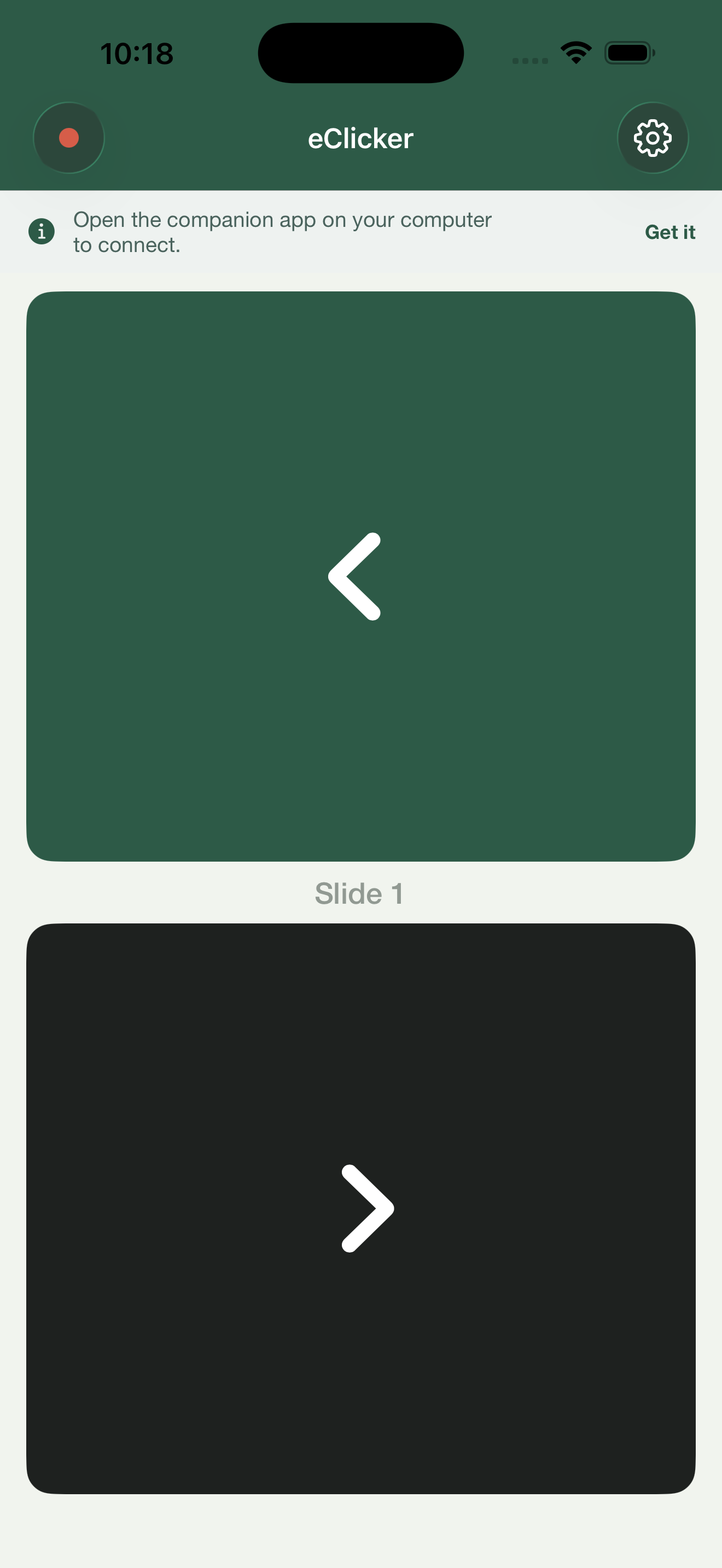
Two large buttons — forward and back. Each tap sends an arrow keystroke to your computer. Works with Keynote, PowerPoint, Google Slides, and any app that uses arrow keys.
Uses BLE for instant, low-latency communication. No Wi-Fi needed, no network configuration. Works in any room with any Bluetooth-enabled computer.
Sends standard left/right arrow keystrokes. Works with Keynote, PowerPoint, Google Slides, PDF viewers, Figma presentations — anything that responds to arrow keys.
Feel a subtle vibration on every tap so you know the command was sent — even without looking at your phone. Toggle it off in settings if you prefer silent operation.
A live counter tracks which slide you're on. Reset it before each presentation. Glance down to know exactly where you are without turning to face the screen.
The display stays awake while connected so you never have to unlock mid-presentation. Automatically dims again when you disconnect.
eClicker collects zero data. No analytics, no tracking, no login. Bluetooth communication is local-only between your iPhone and your computer. Nothing leaves the room.
If the connection drops, the companion app reconnects automatically within seconds. No need to restart anything — just keep presenting.
Two buttons. That's the whole UI. No laser pointer gimmicks, no timer overlays, no feature bloat. eClicker does one thing and does it right.
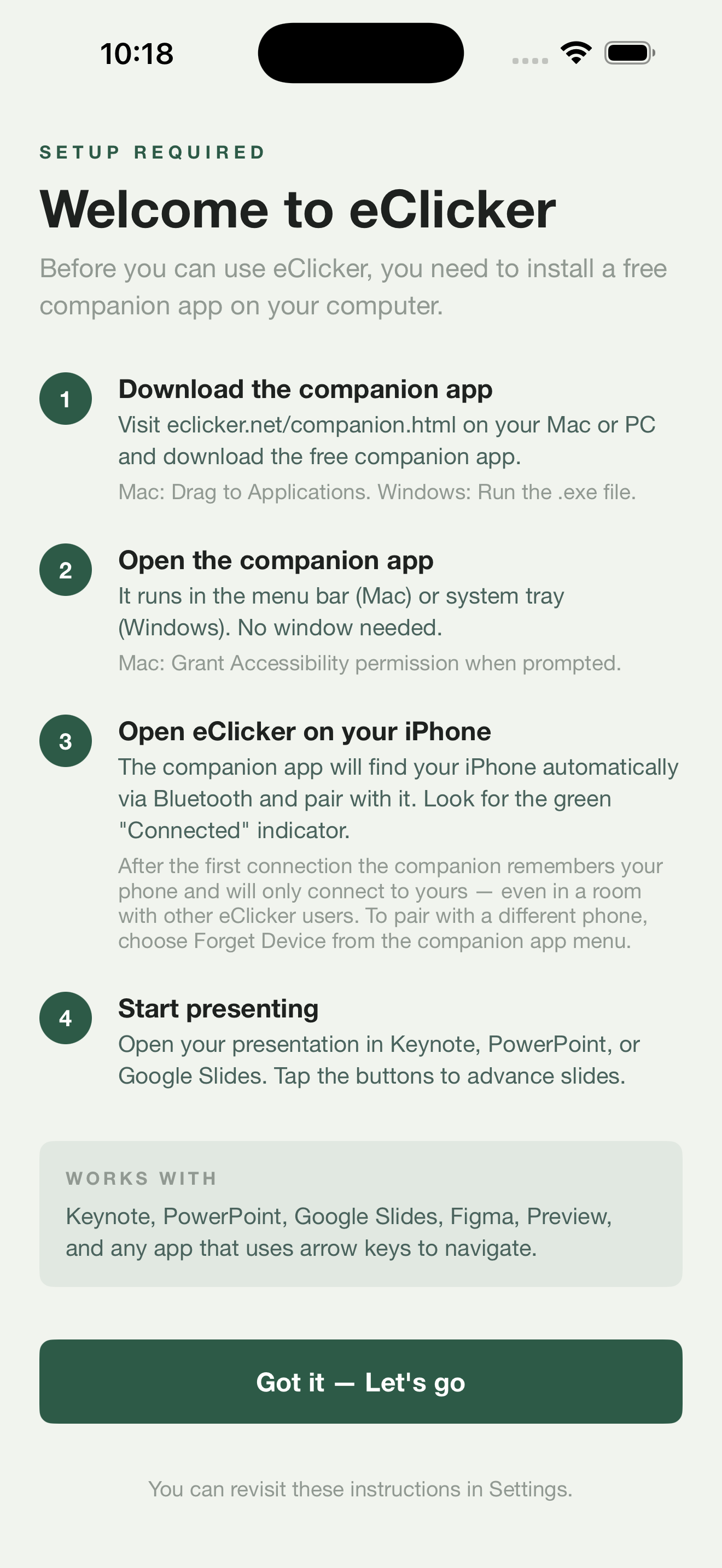
eClicker on your iPhone sends Bluetooth commands. A small companion app on your computer receives them and translates them into keystrokes. It's free, lightweight, and takes 30 seconds to set up.
Download the companion, drag it to Applications, and open it. It lives in your menu bar as a small icon showing connection status. Grant Accessibility permission when prompted — this lets it inject keystrokes into your presentation app.
Runs silently. Uses negligible CPU and memory. Quit from the menu bar when you're done.
macOS 13 Ventura or laterDownload the single .exe file and run it. No installer needed. It sits in your system tray, shows connection status, and injects arrow key presses when it receives commands from your iPhone.
Windows may show a SmartScreen warning on first run — click "More info" then "Run anyway." This is normal for apps distributed outside the Microsoft Store.
Windows 10 or later with BluetoothNo. eClicker uses Bluetooth Low Energy built into your iPhone, Mac, and PC. No dongle, no USB receiver, no extra hardware.
Any app that uses arrow keys to navigate: Keynote, PowerPoint, Google Slides, Figma, Preview, PDF Expert, Prezi, and more.
No. $4.99 once, yours forever. No subscription, no in-app purchases, no account required. The companion app is free.
Bluetooth Low Energy typically works up to 10-15 meters (30-50 feet) indoors — more than enough for any classroom, meeting room, or stage.
Yes. eClicker uses Bluetooth only. No Wi-Fi, no internet, no network required. Works in airplane mode with Bluetooth enabled.
iOS doesn't allow apps to send keystrokes to other devices directly. The companion bridges that gap — it receives the BLE signal and simulates an arrow key press on your computer.
One purchase for the iPhone app. Companion apps for Mac and Windows are free.
iOS 16+ · $4.99